
The Appointment Reminders dashboard shows the full picture for every day — how many reminders went out, how many patients confirmed, how many cancelled, and how many clicked the reminder link. Your front desk knows exactly where every appointment stands before the day begins.
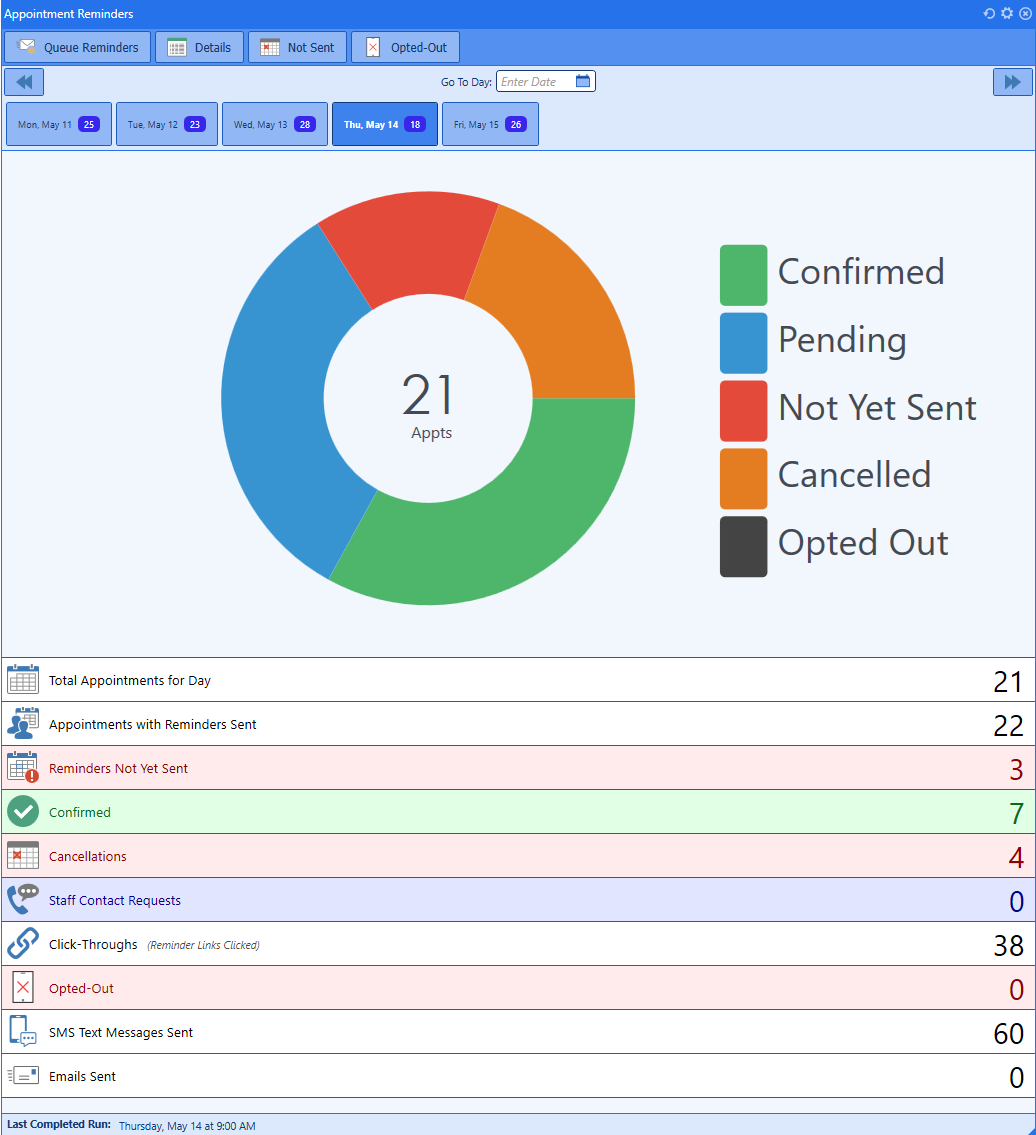
Confirmed, pending, cancelled, and click-throughs — the full reminder picture for every day. Click to enlarge
Most reminder systems send a message and stop there. PracticeStudio SMS is two-way — patients can reply, confirm, ask questions, or request a callback, and every response lands directly in the Chat Conversations inbox.
Your front desk sees every reply in real time. No missed messages, no patients texting into a void, no phone tag to confirm an appointment that could have been handled by text.
Patient replies land directly in the Chat Conversations inbox — organized by patient, visible to your entire front desk team in real time.
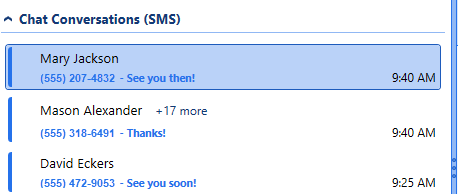
Patient replies organized by conversation — your front desk sees every message as it arrives. Click to enlarge
PracticeStudio SMS covers every touchpoint in the patient relationship — before the visit, between visits, and when a balance is due. All automated. All tracked.
Automated reminders go out before every scheduled visit. Patients confirm, cancel, or request contact by replying directly. Your front desk sees every response in real time — no phone calls required to fill or cancel a slot.
Bring patients back based on time elapsed or clinical data in their chart. Build campaigns around diagnosis codes, visit history, age, financial class, and more — so the right patients get the right recall message at the right time.
Automated balance and collections reminders that go out on your schedule. Reduce outstanding balances without your front desk making collection calls — the system contacts patients and tracks responses automatically.
Every tool your practice needs to automate patient communication — outbound and inbound.
See how many patients clicked the link in their reminder. Know which reminders are working and which patients engaged before they ever walk in the door.
Set reminders to go out on your schedule — 48 hours before, 24 hours before, day of. The system runs automatically. No manual sends, no forgetting.
Patients who opt out are tracked automatically. Compliance is handled — opted-out patients won’t receive future messages without your team doing anything manually.
Send reminders by text, email, or both. Set your preferred output order per campaign — SMS first, then email if no response, or any combination that fits your practice.
Navigate by date to see the reminder status for any day — confirmed, pending, cancelled, not yet sent, and opted out. Your morning huddle just got easier.
Filter recall campaigns by age, gender, diagnosis codes, financial class, last visit date, and more. Send the right message to the right patient population — not everyone at once.
Every unanswered reminder is a missed appointment. Every missed recall is a patient who drifted away. Every uncollected balance is revenue that didn’t come back. PracticeStudio SMS automates all three — appointment reminders, patient recalls, and balance follow-up — so your front desk focuses on the patients who are actually in the office.
A live demo takes 20 minutes. We’ll walk through appointment reminders, recall campaigns, and the two-way conversation inbox — so you can see exactly how your front desk would use it every day.